How to automate your wedding business with AI — without sounding like AI
A practical system for using AI across enquiries, follow-ups, timelines, and content while keeping your judgement and voice intact.
By Wedding Institute · 20 July 2026
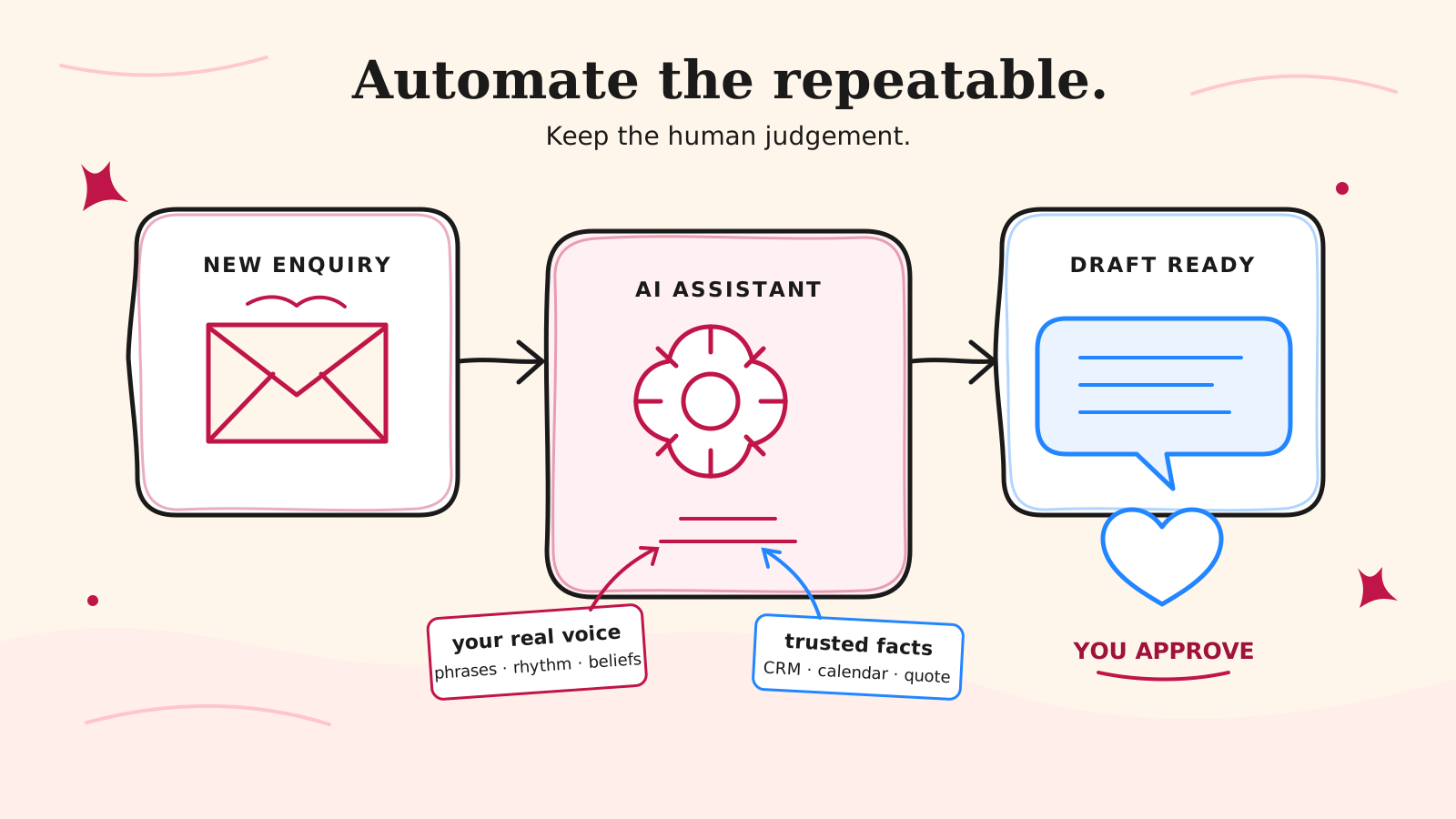
AI can save a wedding business a serious amount of admin. It can also make every email sound as if it came from the same slightly overeager marketing department.
The difference is not the tool. It is the system around it.
Give AI a vague instruction and it will guess. Give it your real language, useful context, clear boundaries, and a defined job, and it becomes a capable first-draft assistant. The goal is not to automate your personality. It is to automate the repetitive work around your expertise so you have more time to use it.
Start with a workflow, not a chatbot
“Use more AI” is not a plan. Choose one task you already repeat and write down what happens from beginning to end.
For example, a new-enquiry workflow might be:
- Read the couple’s message.
- Check the date, location, service, and budget.
- Check availability.
- Write a personal reply.
- Suggest the right next step.
- Update the lead in your CRM.
That list tells you where AI can help and where it should stop. It can extract the important details, identify missing information, draft a reply, and suggest a follow-up task. Your calendar or CRM should remain the source of truth for availability. You should still approve the price, promise, and final message.
Automate repetition, not judgement.
Capture your voice before you generate anything
Most people begin with “write an email to a couple”. That is why the result sounds generic: the AI knows the assignment, but it does not know you.
Your brand voice is not “modern”, “premium”, or “fun”. Those words are too broad to be useful. Your voice is made of observable choices:
- the phrases you naturally use in consultations and voice notes;
- whether your sentences are short and direct or warm and expansive;
- how you explain a difficult decision without sounding defensive;
- what you believe about weddings, clients, budgets, and your craft;
- how much humour you use, and when you avoid it;
- words, claims, clichés, and sales tactics you would never use.
Collect three to five real examples: a strong enquiry reply, a helpful client email, part of a consultation transcript, and a social post that genuinely sounds like you. Real language is much more useful than an invented brand persona.
Then ask your AI assistant to identify the patterns. Do not ask it to write anything yet. Ask it to produce a short voice guide covering tone, rhythm, authority, humour, beliefs, preferred phrases, banned language, and two examples of how you explain things.
Turn that voice into a reusable instruction
Your finished guide should be brief enough to reuse. A practical version might look like this:
Write in a calm, warm, direct voice. Sound like an experienced wedding professional speaking to one couple, not a brand broadcasting to an audience. Use plain English and specific details. Keep paragraphs short. Be confident without becoming pushy. Light humour is welcome when the situation is relaxed, never when discussing money, delays, or a concern. Do not use “dream day”, “perfect wedding”, “elevate”, “curated”, or vague luxury language. Never invent availability, prices, policies, or event details. If information is missing, flag it for me.
Treat this as a starting point, not sacred text. Improve it whenever an output feels wrong. “Too formal” is hard for AI to act on; “use contractions, remove the long introduction, and ask one direct question at the end” is useful.
Give every automation five things
A dependable AI workflow needs more than a clever prompt. Define these five parts:
1. A trigger
What starts the job? A new enquiry, a completed consultation, a form submission, a wedding reaching its 90-day mark, or a gallery being delivered.
2. Trusted context
What is the AI allowed to use? This might include the enquiry, CRM record, package details, email history, questionnaire answers, and your approved voice guide. Be explicit about which system is authoritative when details disagree.
3. One clear task
Ask for a specific outcome: extract lead details, draft a reply, summarise a consultation, build a checklist, or turn approved notes into a blog outline. Avoid asking one automation to think, decide, write, update records, and contact the client all at once.
4. Guardrails
Say what it must not do. It should not invent facts, confirm an unavailable date, change a quote, offer a discount, give legal advice, or promise another vendor’s work. Tell it what to do when information is missing or contradictory.
5. An approval point
Decide what can happen automatically and what needs a person. Internal summaries and task suggestions are low risk. Messages to clients, pricing decisions, contract changes, payment actions, and timeline commitments deserve review.
Five useful automations for wedding vendors
Enquiry triage and first replies
Have AI pull names, date, venue, service, budget, referral source, and open questions from each enquiry. It can draft a reply in your voice and suggest one next step. You check availability and approve the send.
Consultation follow-up
Turn a transcript or notes into a concise summary: priorities, decisions, concerns, promised actions, and unanswered questions. Use that summary to draft a personal follow-up while the conversation is still fresh.
Client workflow emails
Create approved templates for questionnaires, planning milestones, final confirmations, and delivery. Let AI personalise them using known details, but keep dates, amounts, addresses, and contractual language tied to verified fields rather than generated prose.
Timeline and brief checks
Ask AI to compare a run sheet, questionnaire, and vendor brief, then list conflicts and missing information. That is different from letting it silently “fix” the timeline. It finds the problems; you make the calls.
Content from work you have already done
Once a wedding is delivered, use approved notes, testimonials, and supplier details to create a blog outline, caption options, or a case-study draft. Your experience is the source material. AI helps reshape it; it should not manufacture a story.
Use the full voice treatment where trust is at stake
Not every automated message needs personality. A calendar reminder can simply state the time and link. A request for a missing address should be clear, not poetic.
Put the most effort into communication that affects trust or a decision:
- enquiry and proposal emails;
- website and sales copy;
- consultation follow-ups;
- messages about money, timing, or problems;
- nurture emails and useful social content.
This is where generic writing makes you look interchangeable, and where a recognisable point of view does the most work.
Audit the draft before it leaves your business
AI output is a first draft. Read it once for facts and once for voice.
Check every name, date, amount, venue, inclusion, link, and promise. Then cut the padded introduction, vague compliments, repeated conclusion, and any sentence you would never say aloud. Adding one specific observation from the enquiry will usually do more than adding another paragraph.
A useful final instruction is:
Mark any statement that is not supported by the supplied information. Identify two lines that sound generic. Then produce a tighter version that removes 15% of the words without losing any facts, warmth, or next steps.
Build one small loop this week
Choose a task you do at least three times a week. Give the AI three good examples, your voice guide, the trusted source material, and a strict definition of the output. Keep a human approval step. Run it ten times and note every correction you make.
Those corrections are not wasted effort. They are the instructions for the next version of the system.
The best AI automation does not call attention to itself. The couple receives a faster, clearer, more personal experience. Your records stay accurate. You spend less time rebuilding the same email, summary, or checklist from scratch. And the business still sounds unmistakably like the people who run it.